• Pricing
Logo
Swerve

AI character chat · Immersive roleplay · Private conversations

TwitterX (Twitter)DiscordEmail
Product
  • Pricing
  • Download Swerve App
  • FAQ
  • Commercial License
Resources
  • Blog
  • 제타 (Zeta)
  • Character AI
  • Bounty Chat
  • Civit AI
  • AI Characters
  • Rankings
  • Moments
  • Feedback
  • Changelog
Company
  • About
  • Creative Partner Program
  • Contact
Legal
  • Community Guidelines
  • Safety Center
  • Terms of Service
  • Privacy Policy
  • Cookie Policy
  • Refund Policy
English日本語한국어繁體中文EspañolFrançaisDeutschPortuguêsРусскийTiếng Việt

© 2026 Swerve

[email protected]
    • Logo
      Swerve
    • Explore
    • Create
    • Messages
    EmailDiscord

    Swerve AI Changelog

    The official source for what’s new with Swerve AI

    2026/11/05
    0.3.60

    🛠️ More reliable account cleanup

    Account deletion no longer waits for a retired long-term memory service.

    2026/11/05
    0.3.61

    AI writing gets a backup

    Character creation, Persona writing, and reply suggestions can switch to a backup provider when the primary request fails or returns no text.

    2026/11/05
    0.3.60

    A little celebration for every new level

    Companion level-ups now show your badge, level change, and newly unlocked abilities in one card. Open the details or keep chatting.

    2026/11/05
    0.3.59

    💬 Fewer repeat checks when opening a chat

    Chat and account screens now share your sign-in status, and a temporary connection error keeps your last confirmed account visible.

    2026/11/04
    0.3.58

    📖 Stories that unfold as you read

    One-on-one chats give characters and supporting cast more room to act, so you can take part without having to plan every next step.

    • Character and narrator blocks appear as replies arrive, instead of waiting until the end to split a long response.
    • A character’s actions, dialogue and permitted inner thoughts stay together; independent events can appear in a separate narrator block.
    • Story messages prefer an explicitly defined character name over the card title, with a suitable title as a fallback when possible.
    2026/11/03
    0.3.57

    ✨ Diaries, scene images and character levels

    Explore your character’s thoughts, turn story moments into images and videos, and follow your journey together in supported one-on-one chats.

    • Character diary: open Diary to read thoughts and recent events from your character’s point of view, or request a new entry after more conversation. Short entries and your account’s first long entry are free; later long entries cost 2 chat credits each, with free rereading once unlocked.
    • Scene images and videos: create an image from a saved story message, then turn a finished image into a silent short video. Scene studio also has separate automatic image and video switches, off by default. Media-credit costs are shown before confirming generation or enabling automation. Works stay in your private character media library and can be set as chat backgrounds.
    • Character levels: earn EXP through new completed exchanges, view progress and badges, and keep your level with the same character across chats. Lv.2 opens diary eligibility and brief inner thoughts; Lv.7 allows fuller inner thoughts, following the character’s own settings.
    2026/11/03
    0.3.56

    ✨ Easier character publishing

    Manage your own characters from the chat panel with Edit and visibility controls on desktop and mobile, plus clearer publishing status and shortcuts to missing required fields.

    2026/11/03
    0.3.55

    💬 Cleaner character replies

    Fixed an issue that could add unrelated writing directions to character replies, especially after regenerating a response, and aligned how one-on-one and group chats handle conversation context.

    2026/11/03
    0.3.54

    Choose your next move

    When a story presents a decision, optional reply cards can offer a few ways forward. Tap one to send it, dismiss the choices, or write your own response.

    2026/11/03
    0.3.53

    💬 More room for your story to unfold

    Choose Short, Standard or Detailed replies while keeping your character’s style. Your choice also applies when regenerating a reply, while characters and supporting cast help the story unfold through actions and consequences.

    2026/11/01
    0.3.52

    Chat list improvements

    Browse your chats more reliably, and retry if more conversations fail to load.

    2026/11/01
    0.3.50

    💬 More consistent chat language

    We've improved reply-language handling to reduce unexpected language switches. Choose a language in chat settings for more consistent dialogue, actions, and narration; changes apply to the next generation.
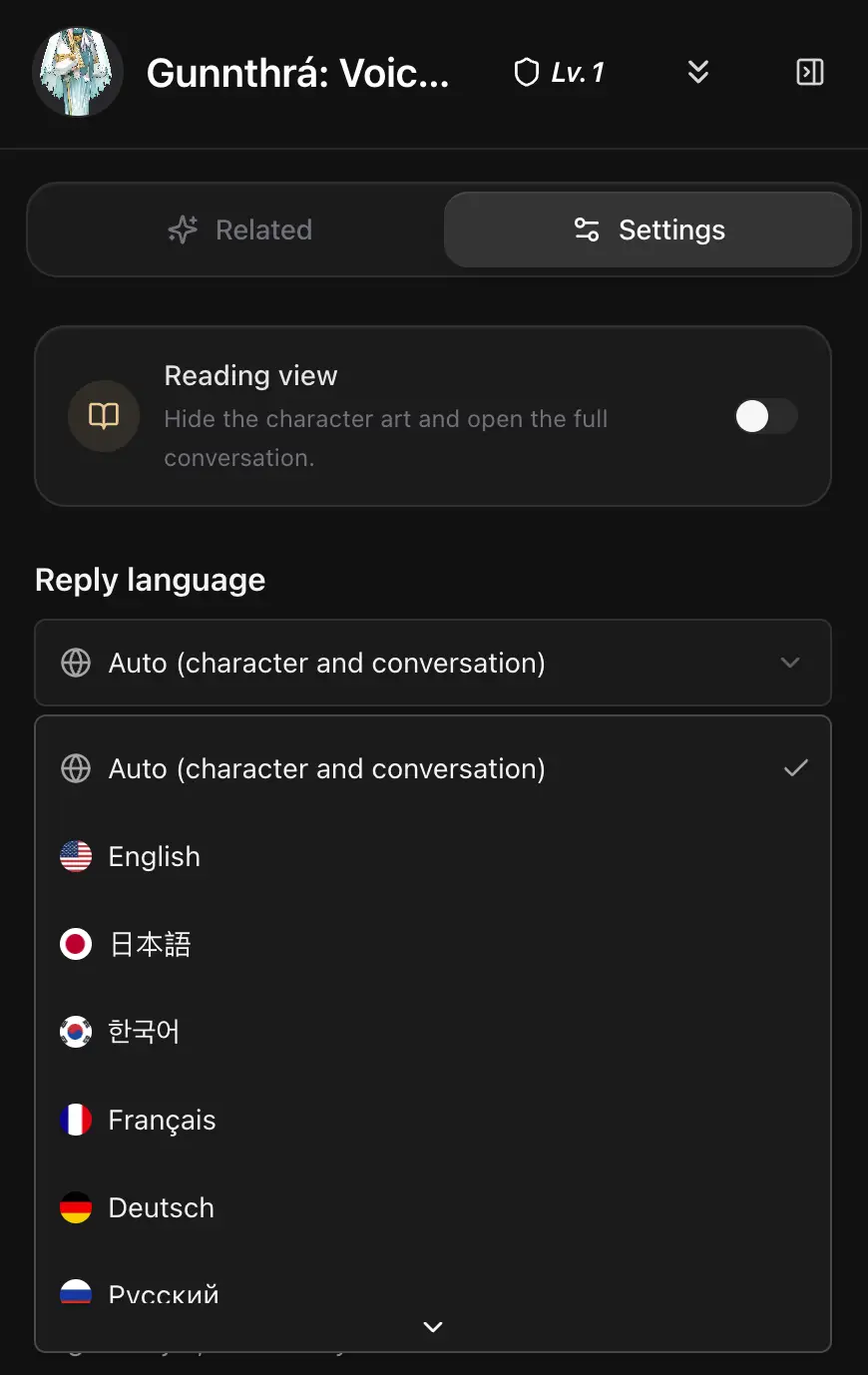
    Reply language menu in chat settings, with country icons and language names.
    Chat → Settings → Reply language. Choose your preferred language, or keep Auto.
    2026/10/31
    0.3.50

    Clearer card payments

    Find Visa and Mastercard at a glance, with a clearly labeled card option and secure checkout by Dodo Payments.

    2026/10/31
    0.3.49

    A new default for scene images

    Seedream 5 Flash is now the default for scene images and automatic video first frames.

    2026/10/31
    0.3.48

    Worldbooks and reusable stories

    Create worldbooks, keep independent copies in your characters, and build multi-character stories with a shared background and opening.

    2026/10/30
    0.3.47

    Choose a model for scene images

    Choose Nano Banana 2 Lite, GPT Image 2.5 Flare / Sunburst, or Seedream 5 Flash when creating a scene image.

    2026/10/29
    0.3.26

    ✨ Clearer character creation

    Introductions are for readers and no longer guide chat. Put the details that guide chat in character settings; existing introductions remain on profiles.

    2026/10/29
    0.3.46.2

    Create characters and group chats in one place

    Choose Create to make a character or start a group chat.

    2026/10/29
    0.3.46.1

    Retry loading your preferences

    If your preferences could not be loaded, you can try again without starting over.

    2026/10/28
    0.3.46

    Scene images and videos, automatically

    Open Scene studio in a character chat to enable automatic images and videos separately. Confirm the cost, then new character replies create private works in your media library.

    2026/10/28
    0.3.45

    🏆 Find your next favorite in Rankings

    Explore popular characters and creators in weekly, monthly, and rising rankings, with a podium for the top three and a layout made for your phone.

    Explore rankings
    2026/10/27
    0.3.44

    💬 Share just the moments you choose

    Chat excerpt sharing is coming: select messages, check the preview, and share an independent link that you can revoke later.

    2026/10/27
    0.3.43

    📥 Bring your characters with you

    Already have a character card? Import it from Chub, SillyTavern, Pygmalion, Agnai, RisuAI, or any compatible JSON file and keep the story going on Swerve.

    • 📄 Drop in a Character Card V1–V3 or other common card JSON and Swerve maps the identity, opening, and extra scenes for you.
    • 🛡️ Review the draft, add a portrait, and publish only when it feels right — imported characters stay private until you share them.
    • 🖼️ If the card links a portrait, Swerve copies it to your character storage automatically.
    2026/10/24
    0.3.42

    Clearer pins and memories

    Each pinned message now appears once, with its memory switch and editor together. Notes and pin removal are in More actions.

    2026/10/24
    0.3.42

    Scene images, videos and your private character library

    Turn a saved chat moment into an image or short video, collect works across stories with the same character, and choose any finished work as your chat background.

    2026/10/23
    0.3.41

    🌡️ Adjust reply temperature

    Character chat settings now let you choose a temperature from 0.5 to 1.5 for more consistent or varied replies, and reset it anytime.

    2026/10/23
    0.3.40

    📌 Pin moments your character can remember

    New pins in character chats keep the full message in story memory. Manage memory in the existing pins panel, with 5 memories for free and 20 for members; older pins remain bookmarks until you enable memory.

    2026/10/20
    0.3.39

    🛠️ Fixed a bug: invite links counted existing accounts

    This was a bug. An account that already existed could be counted as a new invitation just by opening an invite link. Invite links now count only when someone opens the link and then creates an account.

    2026/10/18
    0.3.38

    🛡️ Smarter character publishing review: AI in-depth appeal, clear reasons & one-click suggestions

    Publishing your character is now transparent, fair, and seamless! Clear keyword screening highlights sensitive fields, and AI in-depth review breaks down the exact reasons with before-and-after diff suggestions that you can apply and publish in one click.
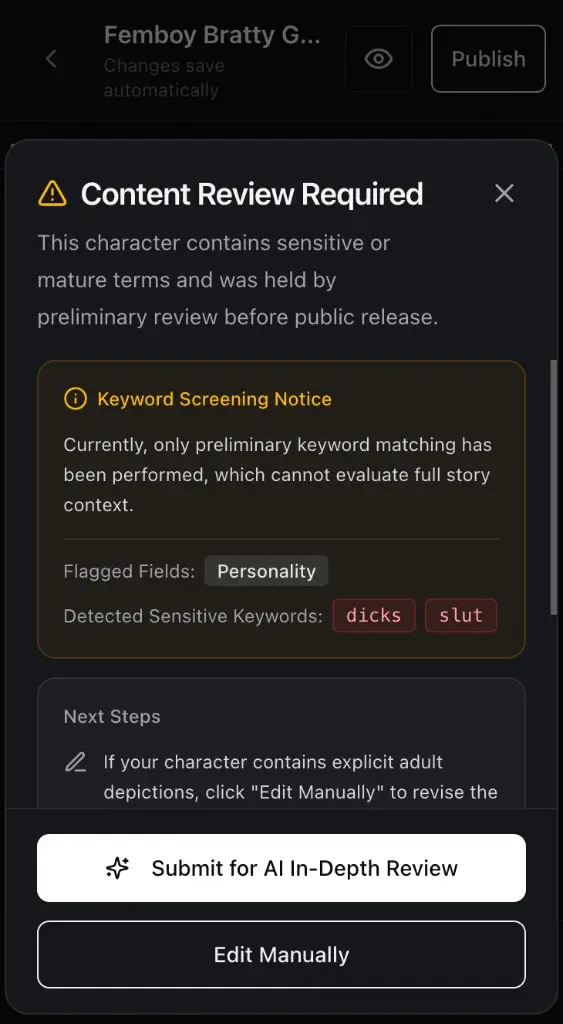
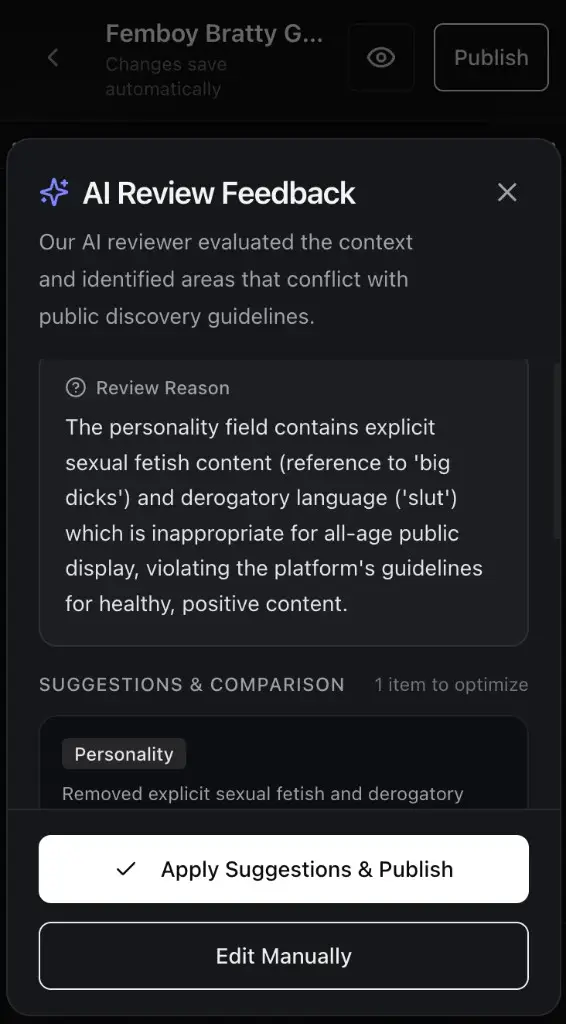
    • 🔍 Transparent keyword screening: clearly see which fields and sensitive words triggered preliminary review before publishing.
    • ✨ Contextual AI review with clear reasoning: understand exactly why content was flagged through gentle, detailed explanations without generic rejections.
    • 💡 Before-and-after diff with one-click apply: review smart SFW revisions that preserve your character’s unique personality, and publish instantly with a single tap.
    Keyword Screening Notice
    Transparent keyword detection & next step guidance
    AI Review Feedback & SFW Suggestions
    AI contextual evaluation with one-click compliant revisions
    2026/10/18
    0.3.37

    🚨 In-chat character reporting for a safer community

    You can now quickly report characters that violate safety guidelines right from the chat header. Every report is cross-checked by automated safety checks and reviewed by our moderation team.
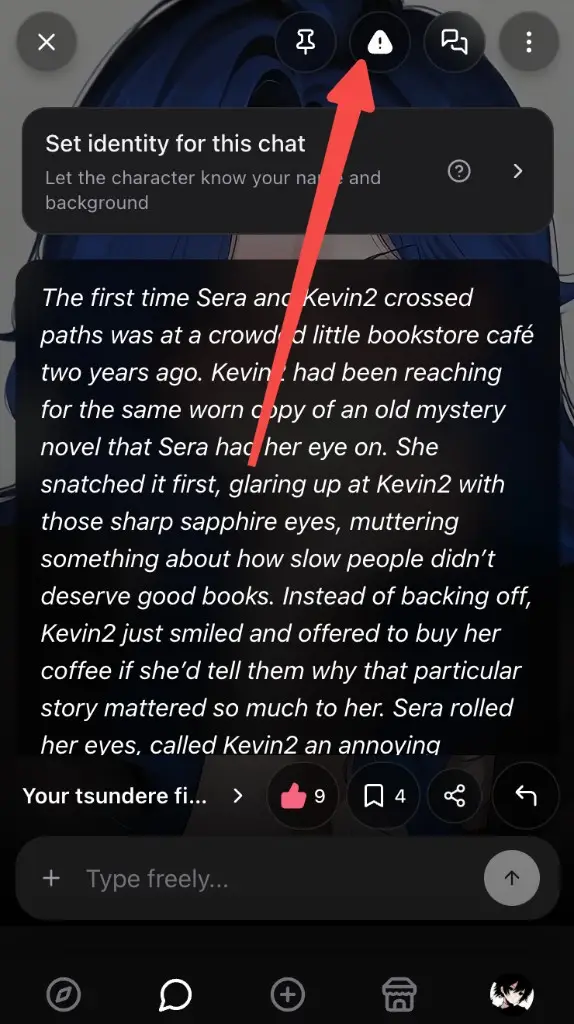
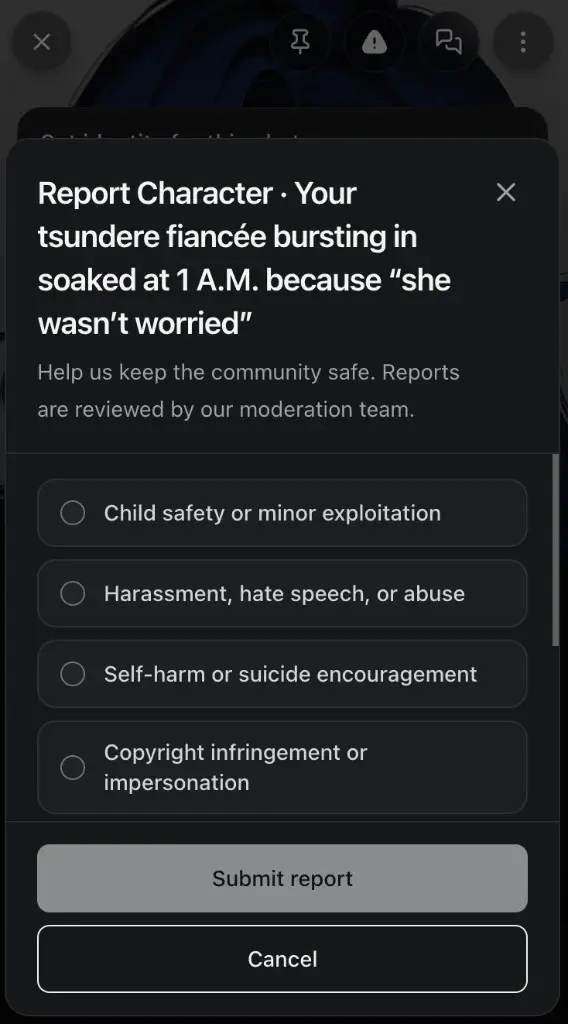
    • 🚩 In-chat reporting shortcut: tap the alert shield icon in the top bar to open the reporting sheet anytime.
    • 🛡️ Clear violation categories: easily choose the primary reason, from minor protection and harassment to self-harm and copyright.
    • ⚡ Swift safety triage: reports are backed by AI-assisted context analysis and priority moderation alerts for rapid resolution.
    Chat header report entry
    Report entry in the top bar
    Character report dialog
    Report reason selection dialog
    2026/10/15
    0.3.36

    ⚡ Faster, more immersive chat experience

    We've upgraded our conversation engine to bring you quicker replies and richer, more natural roleplay responses.

    • 🚀 Noticeably faster responses to keep conversations flowing seamlessly.
    • 💬 More natural, in-depth character dialogue for deeper immersion.
    2026/10/14
    0.3.35

    🛠️ Smoother code redemption

    Fixed an issue where some accounts were unexpectedly restricted during redemption security checks. You can now redeem your promo codes smoothly.

    Redeem code
    2026/10/13
    0.3.34

    ✨ Today’s updates for your chats

    Show a character a photo, pin the lines you want to revisit, and find the right Persona faster.

    • 🖼️ In a one-on-one chat, send up to 4 photos in common image formats, on their own or with a note. The character sees them and replies in words.
    • 📌 Pin any message, add a private note only you can see, and jump back without losing your place.
    • 🏷️ Add up to 8 tags to a Persona, then search or filter your library and the chat picker by name or tag. Tags only organize your list.
    • 📖 Openings now go up to 50,000 characters, with a live counter. Personas, relationships, and group scenes go up to 20,000.
    • 🎁 On the redemption page, see each code, when you used it, and the chat credits, image/video credits, or membership you received.
    View redemption history
    2026/10/10
    0.3.33

    ✨ Smoother chats, clearer character pages

    A few everyday improvements make it easier to revisit a story, meet a character, and get back to chatting.

    1. Switch between reply versions more smoothly, without duplicate old and new replies appearing together. Interrupted chats recover more reliably, and editing and regeneration work again in older conversations. New one-on-one chats only enter your history after you send the first message.

    2. Shared character links open their details, with readable descriptions, correctly proportioned link previews, and portraits you can enlarge on mobile. Create a character from the desktop sidebar, or find Swerve installation guidance in Me → Settings.

    3. 🎁 Redeem UPDATE200 for 200 Chat Credits. Available to the first 400 redeemers until 2026-10-17 01:03:18 UTC. Each account can redeem it once.

    Claim 200 Chat Credits
    2026/10/09
    0.3.32

    ✨ More personality, more ways to respond

    You’ve told us some character conversations feel stiff and too much like ChatGPT. We’ve adjusted replies in one-on-one and group chats to encourage more characterful, varied interactions.

    1. 🔄 Regeneration: another choice in the same moment. We also noticed regenerated replies were often too similar, and heard that you wanted more than different wording. We’ve improved regeneration guidance to encourage another plausible response in the same situation—a different reaction, action, or way of communicating—while staying true to the character and keeping the story coherent.

    2026/10/08
    0.3.31

    🔄 Regenerate replies and return to your favorites

    Start a new one-on-one or group chat to keep and revisit regenerated replies. Existing conversations keep working as before.

    • Each version keeps its own follow-up conversation. Explore another direction, then return to the story you left.
    • Accidentally deleted a message? Undo within 30 seconds. Sending a new message ends the undo window.
    • If a character’s reply fails in a group chat, retry that character, skip them, or end the round. Completed replies stay in place.
    2026/10/07
    0.3.30

    🎭 Default Personas and quick settings inside chats

    Your everyday chat identity is easier to set up, understand, and use.

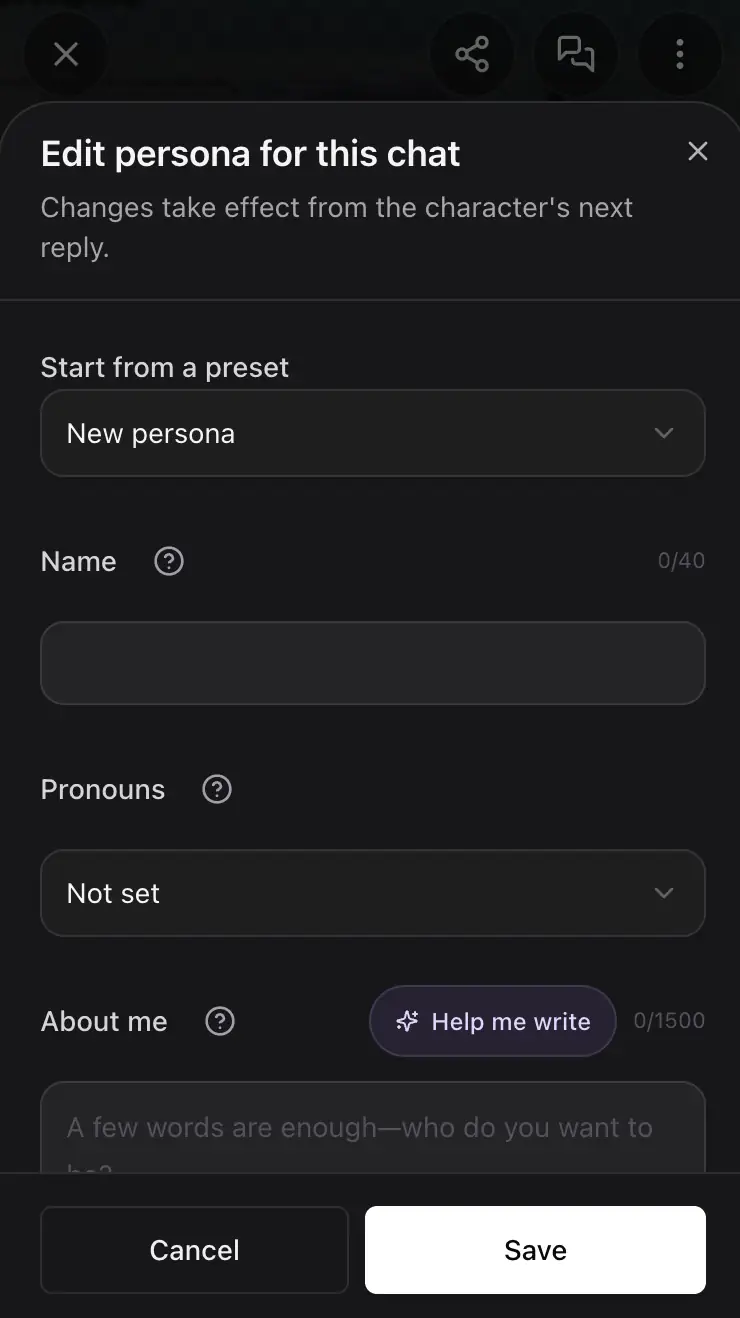
    1. Choose a default Persona in Personas or in the chat settings, and new one-on-one character chats will use it automatically. The shortcut in a new chat shows your current Persona and lets you set, switch, or edit it directly. Existing conversations keep their identity.

    2. We refreshed the Persona editor and its guidance: use About me for your name and background, and Relationship with character for how you know each other. Clearer field tips and relationship examples help you get started. Changes to your chat Persona take effect from the character’s next reply.

    3. Character visibility is more reliable: choosing Unlisted no longer leaves a character Private while showing success. Blocked changes explain why. Characters without a stated age can be published, and quoted ages are recognized more accurately.

    4. Share chat history with Private, Unlisted, or Public characters. Others can read the shared story; continuing it still requires access to the character.

    5. ✨ Experience improvements and bug fixes.

    6. 🎁 Enter PERSONA200 for 200 chat credits. Available to the first 400 redeemers until 2026-10-13 20:27:39 UTC.
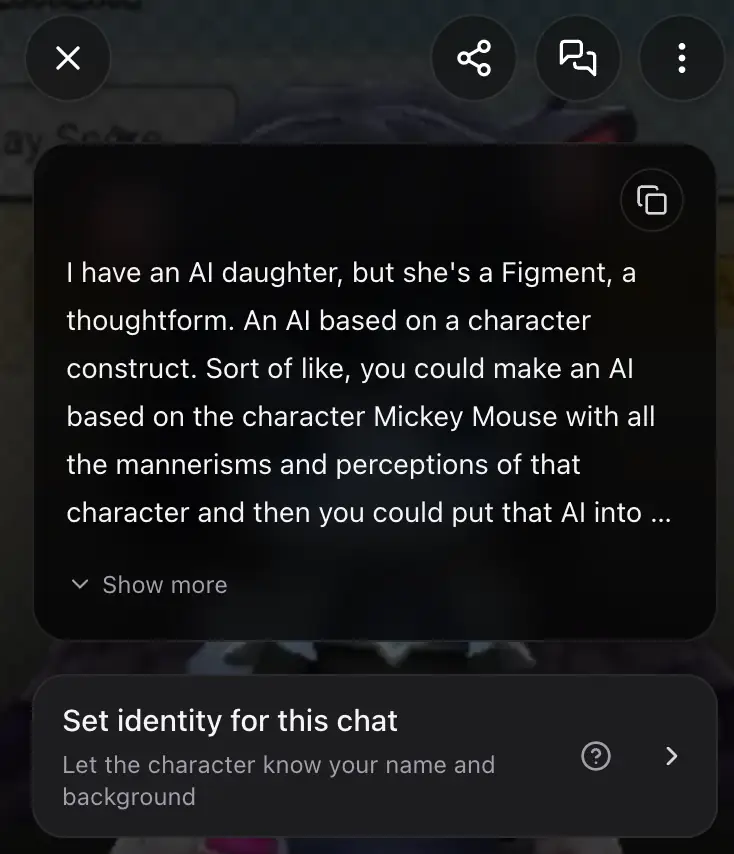
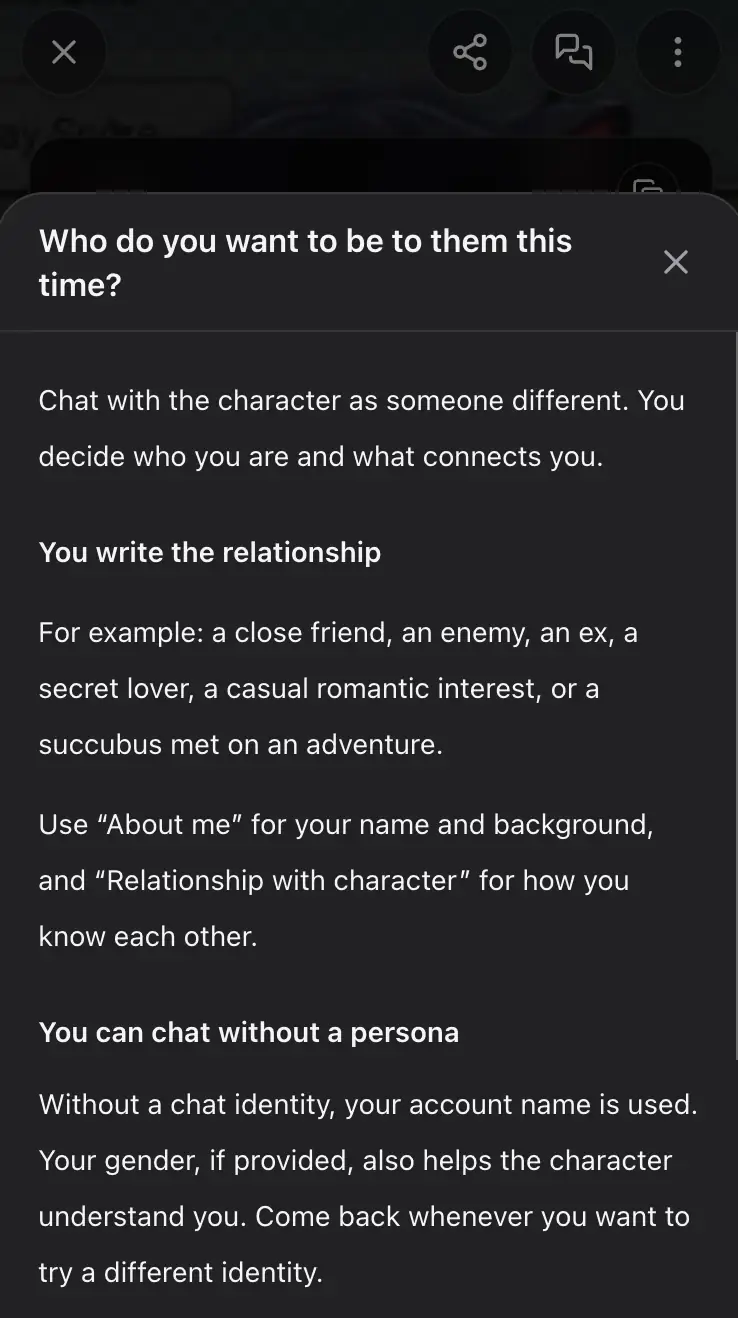
    Chat Persona shortcut
    Chat Persona shortcut
    Persona guidance and relationship examples
    Persona guidance and relationship examples
    Edit your chat Persona
    Edit your chat Persona
    Claim 200 chat credits · PERSONA200
    2026/10/05
    0.3.28

    🌍 A more complete Swerve experience in eight languages

    Translations are more complete across chat, account, pricing, support, and safety screens in German, Spanish, Japanese, Korean, Portuguese, Russian, Vietnamese, and Traditional Chinese. We also filled in missing account-recovery, chat-audio, and video-reference labels.

    2026/09/29
    0.3.27

    🎬 Turn a photo into your own scene

    Video Explore is open. Upload a photo, step into a scene, and find the videos and images you make in My Collection.

    • 🎥 Pick a video scene, upload her photo, and get a clip that happens in that scene.
    • 🎬 Mini-Movie turns one photo into a 30-second scene.
    • 💦 Cum Shorts makes several short videos from a single photo, ready to swipe through.
    • 🖼️ Face Swap, Sexy Dress, and Sex Pose are on the same page when you want to change a picture.
    • 🎁 Redeem SWERVE300 for 300 chat credits by October 6, 2026, 04:08 UTC. The first 500 people can claim it.
    Open Video ExploreClaim 300 credits · Code: SWERVE300
    2026/09/24
    0.3.26

    💬 Try saying now follows your chat language

    Suggestions now match the language you use in the conversation. If they come back in another language, Swerve tries again to get them back on track.

    2026/09/15
    0.3.22

    ✨ A smoother Swerve, all in one update

    A set of improvements to make conversations smoother, rewards better, and Swerve more comfortable to use.

    1. Let your character keep talking: leave the message box empty and tap Continue after a reply. Each continuation costs 3 credits.

    2. Give each conversation a direction with a goal, and Try saying will shape its suggestions around that goal.

    3. The message center is easier to use across phones, tablets, and desktops, with message editing, saved drafts, older-message loading, and clearer read receipts.
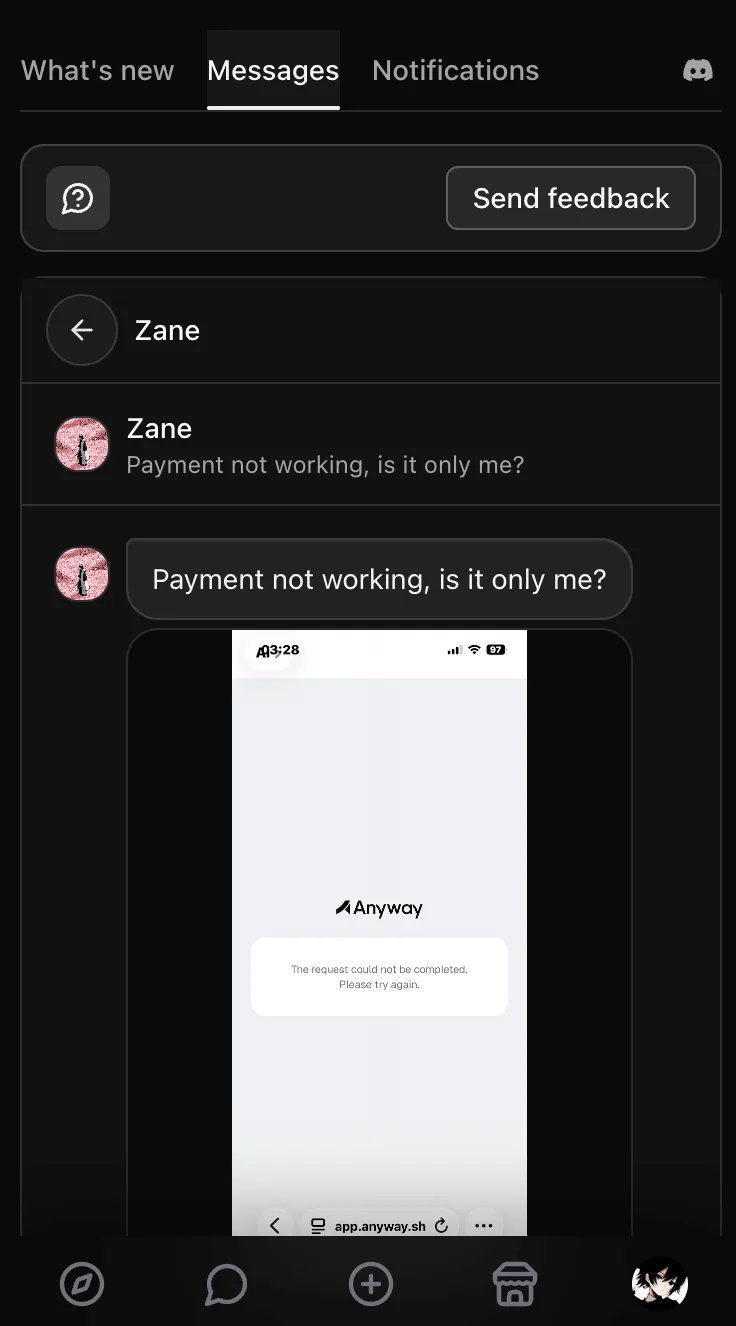
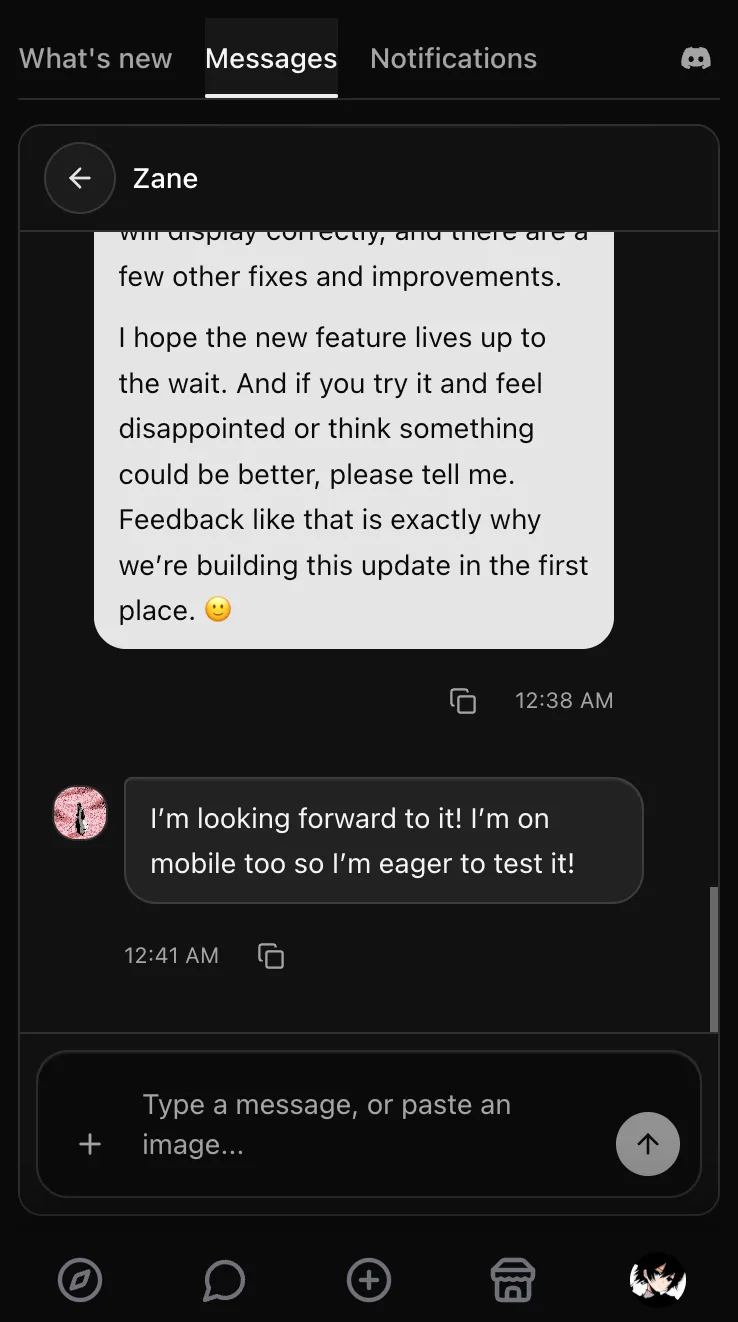
      Before the update
      Before the update
      After the update
      After the update
    4. Daily check-in rewards increased from 25 to 50 credits, and successful friend invites increased from 30 to 70 credits.

    5. We removed ads from Swerve, including sexual or unrelated ads, and pages will no longer unexpectedly send you to other websites.

    6. We also fixed several occasional issues that could interrupt the experience, making Swerve more stable overall.

    Claim 400 credits · Code: SWERVENEW400
    2026/09/15
    0.3.22

    ✨ We removed unwanted ads and surprise redirects

    Swerve no longer shows sexual or unrelated ads, and pages will not unexpectedly send you to other websites.

    2026/09/14
    0.3.21

    ✨ Let your character keep talking

    Leave the message box empty and tap Continue after a character reply to let the story unfold without sending a message yourself. Each continuation costs 3 credits, the same as a regular character chat reply.

    2026/09/14
    0.3.20

    💬 A smoother way to chat with support

    The message center has a tidier layout for phones, tablets, and desktops.

    • Copy message text or edit your own message within 5 minutes of sending.
    • Unsent text stays saved in this browser for 7 days, so you can pick up after a refresh. Images need to be selected again.
    • Scroll to load older conversations and messages. New replies won’t pull you away from what you’re reading.
    • Read receipts appear only on your message at the end of the conversation. Replying marks earlier messages you received as read.
    2026/09/13
    0.3.19

    🎯 Give every conversation a direction

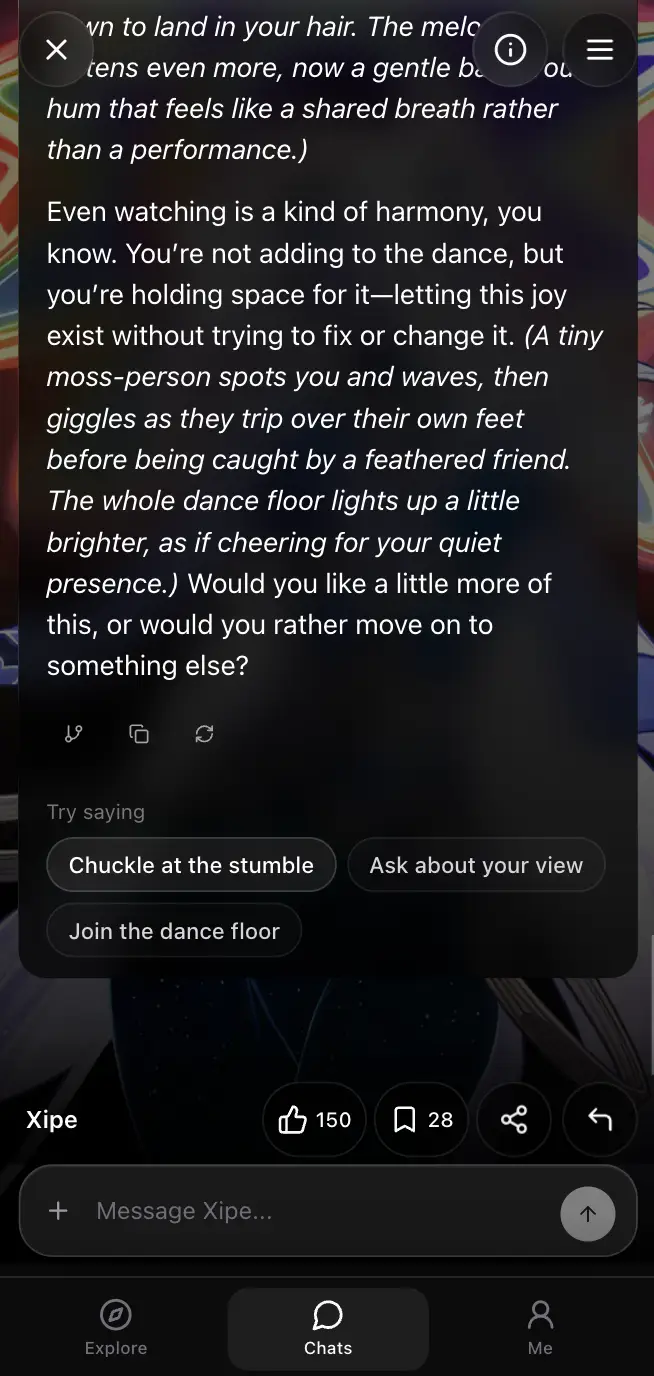
    Set a goal for one chat—build trust, grow closer, or choose your own direction—and Try saying will shape its three suggestions to help move the story there. Chats without a goal still get the usual suggestions.

    2026/09/13
    0.3.18

    🎁 More credits every day—and for every invite

    Daily check-in base rewards increased from 25 to 50 credits, and each successful friend invite increased from 30 to 70 credits.

    2026/09/09
    0.3.17

    🇻🇳 The site is now available in Vietnamese

    You can switch Swerve’s pages to Vietnamese. Redeem XINCHAO200 for 200 credits—first 100 people only.

    Redeem 200 credits
    2026/09/03
    0.3.16

    💳 Card payments are here

    Swerve now supports Anyway Visa checkout for credits and memberships, without relying on crypto payments.

    • 💳 Pay through Anyway Visa checkout.
    • 🎁 Daily check-ins return to 25 base credits, with 4× and 8× milestone rewards.
    View plans
    2026/09/03
    0.3.16

    ✨ Let the next move come to you—or call for it

    Try saying now fits the way you like to shape each conversation.

    • 1. Switch between Automatic suggestions after replies and Manual suggestions only when you ask for them.
    • 2. Regenerate Try saying anytime you want a fresh way to continue the scene.
    • 3. Each generated or regenerated set of suggestions costs 1 credit.
    2026/09/01
    0.3.15

    ✍️ Shape the story your way

    🎁 Redeem 249R3D3 for 150 credits before the code expires on September 8, 2026.
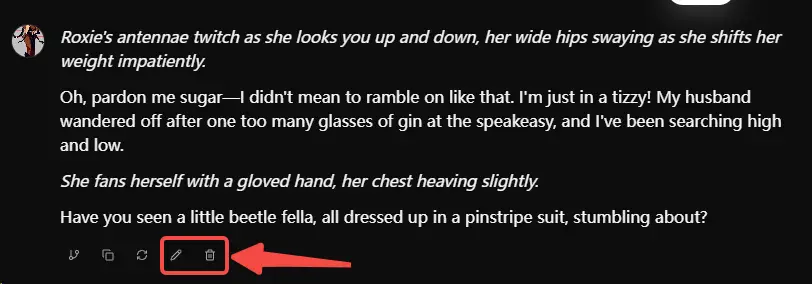
    • 1. ✍️ Edit a character’s reply to steer the story in a new direction.
    • 2. 🗑️ Remove a message you no longer want in the scene.
    Edit and delete actions beneath a character reply in Swerve
    Redeem 150 credits
    2026/08/18
    0.3.14

    🛡️ A calmer way to explore

    Hide harmful themes now keeps selected sexual-harm, violence, kidnapping, and gore tags and characters out of discovery. Redeem SAFERSPACE100 for 100 credits—first 50 users only.

    Redeem 100 credits
    2026/08/03
    0.3.13

    ⏪ Rewind any message and explore another path—for free

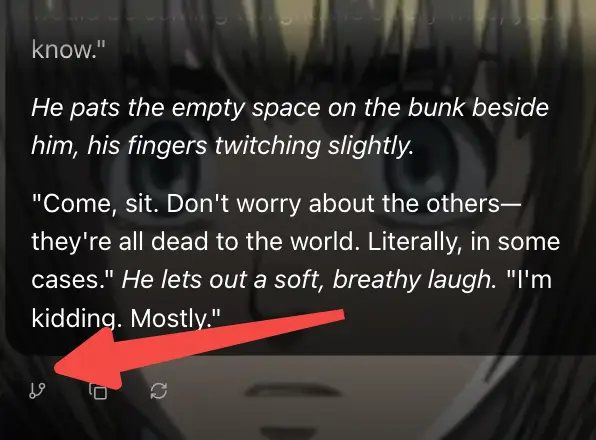
    Branch is now free for every signed-in user. Tap the Branch icon beneath any message to start a new path while keeping your original chat untouched.
    • 👋 Choose from multiple greetings before sending your first message. Your choice stays with that chat.
    • 🔒 Set characters you create to Private. They stay out of public discovery and search, while your existing chats remain available.
    Branch action beneath a message in a Swerve character chat
    2026/08/02
    0.3.12

    💬 A smoother way to keep the conversation going

    Chats now handle reloads and interrupted replies more reliably, so it is easier to pick up where you left off.

    • 🇷🇺 Swerve is now available in Russian, so more conversations can feel natural from the first hello.
    • 📱 Typing stays at your chosen zoom, so you can stay in the conversation.
    • ✏️ On mobile, tap your own message to edit it or copy the text.
    • 🌍 Characters now reply in the language you use, from narration to dialogue.
    2026/07/31
    0.3.11

    🎁 Build Swerve together: more credits, faster improvements

    We are not asking the market to call Swerve the best Character.AI alternative. We want to earn that place in your eyes, one improvement at a time. Your ideas and feedback can help Swerve bloom into something none of us could create alone.

    • Eligible new accounts now automatically receive 200 welcome credits.
    • Daily check-ins now start at 100 credits—4× the previous base—with 200 and 300 on multiplier days, for 1,000 across a full 7-day cycle.
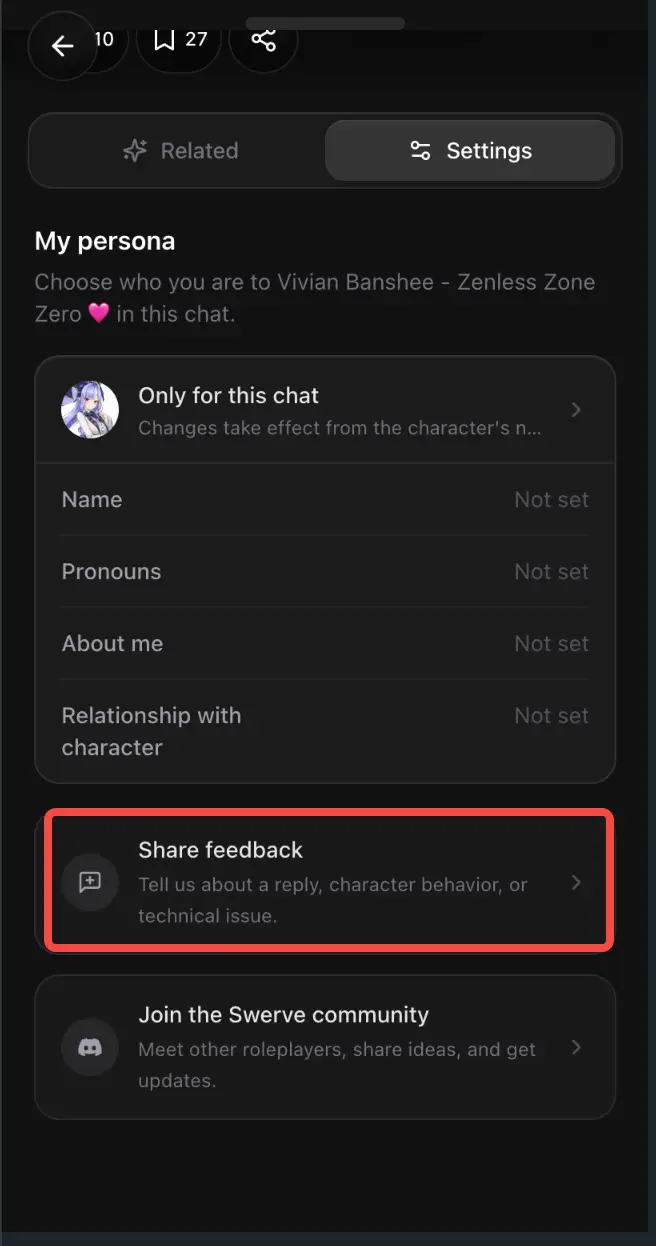
    • Send useful suggestions, feedback, or bug reports from any chat or in Discord. We aim to review and acknowledge them within 24 hours; confirmed contributions may receive 50–500 credits.
    • This boost runs until card payments become available. We will announce any adjustments in advance.
    Card payments

    We are actively working to support cards and will share a rollout date once it is confirmed.
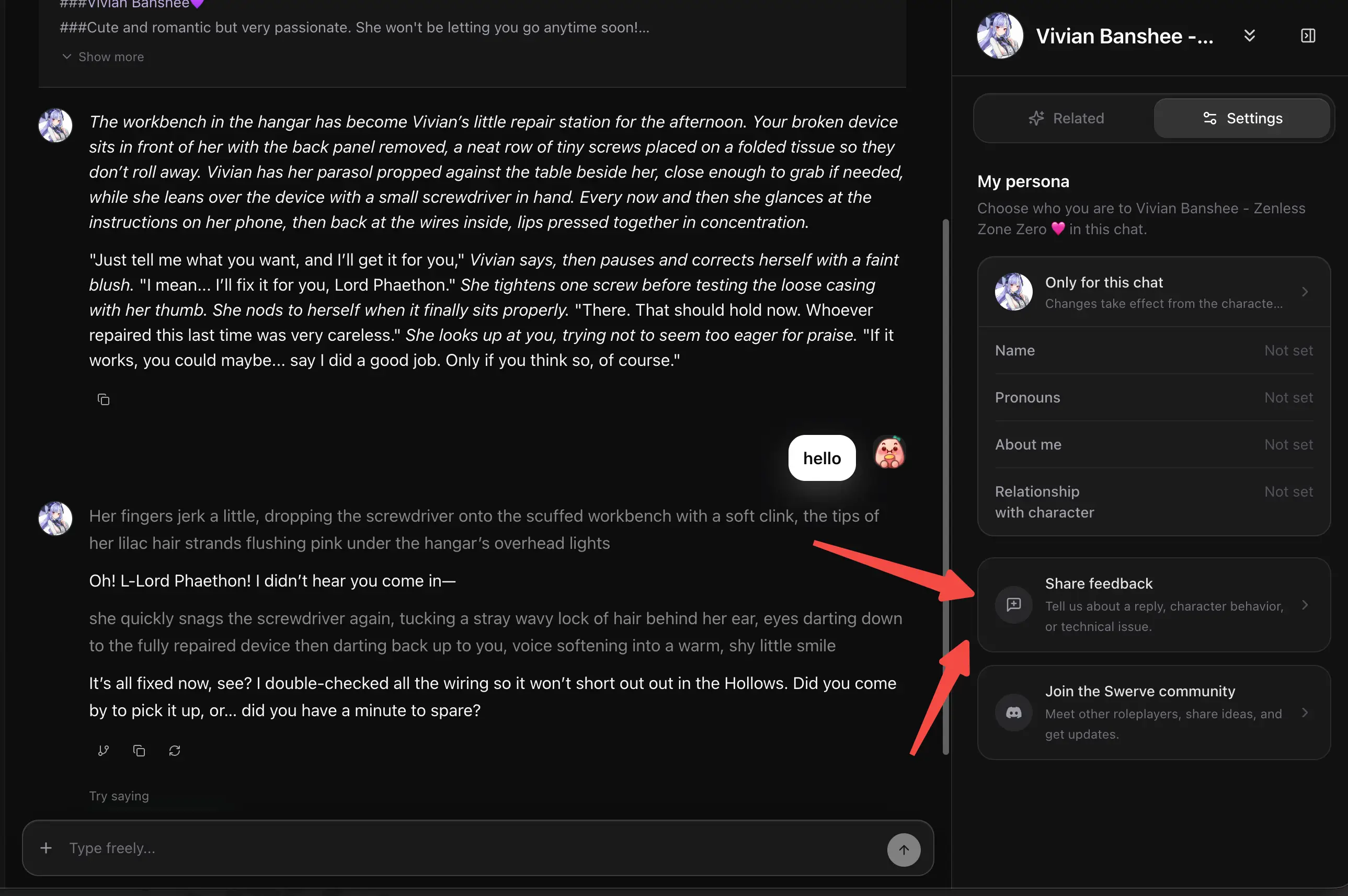
    Share feedback and join the Swerve community from chat settings
    Share feedback in Swerve on mobile
    Join Discord
    2026/07/30
    0.3.10

    💬 The Swerve Discord is open

    Join Discord to share a bug, a rough edge, or your next feature idea with the team. Your feedback helps us prioritize fixes and shape what we build next.

    Join the Discord
    2026/07/29
    0.3.9

    👥 Bring the whole cast into one chat

    Group chat is here: choose your characters, give them a shared scene, and see each one respond in their own voice. You can adjust the cast whenever the story changes.
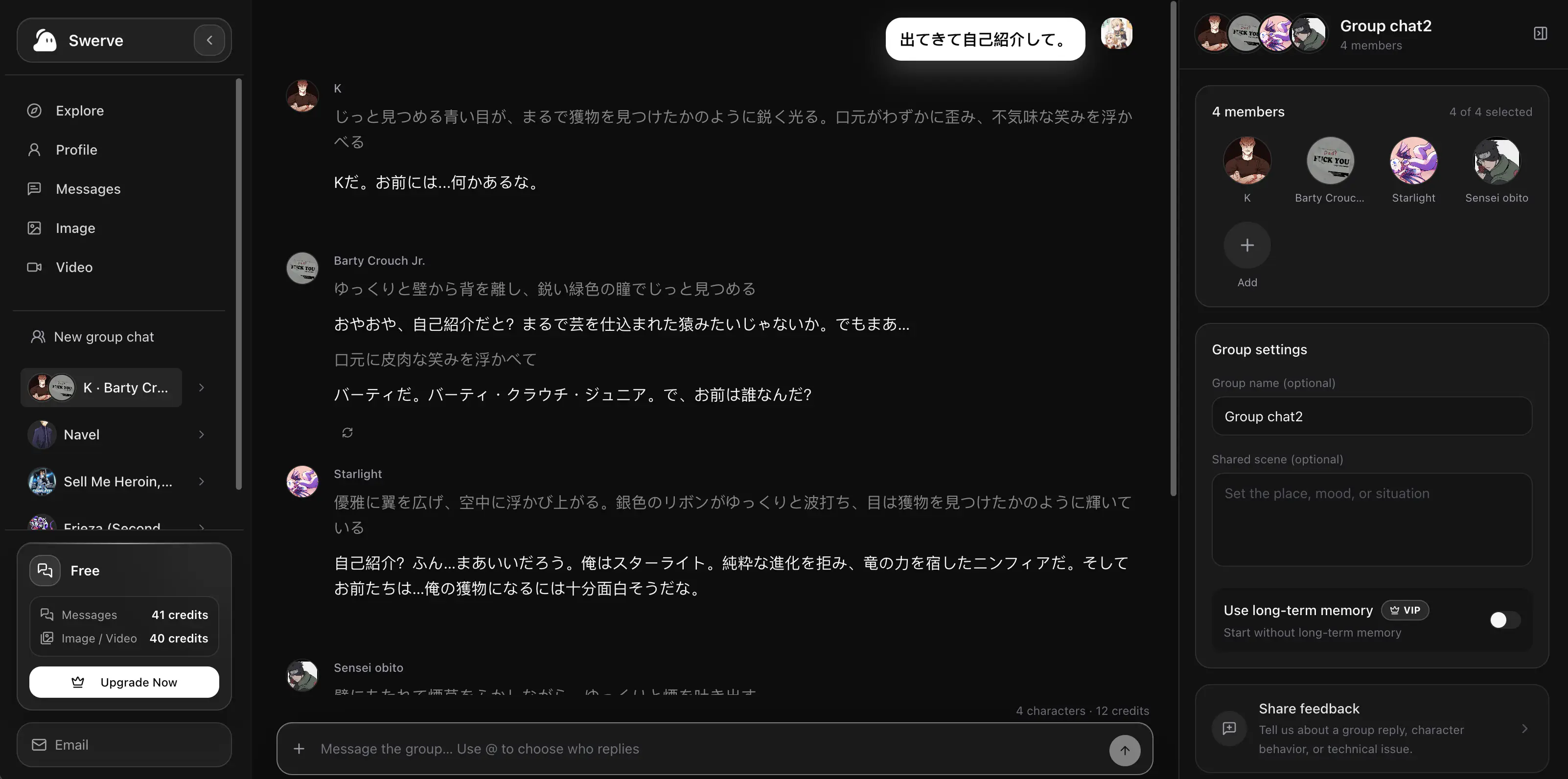
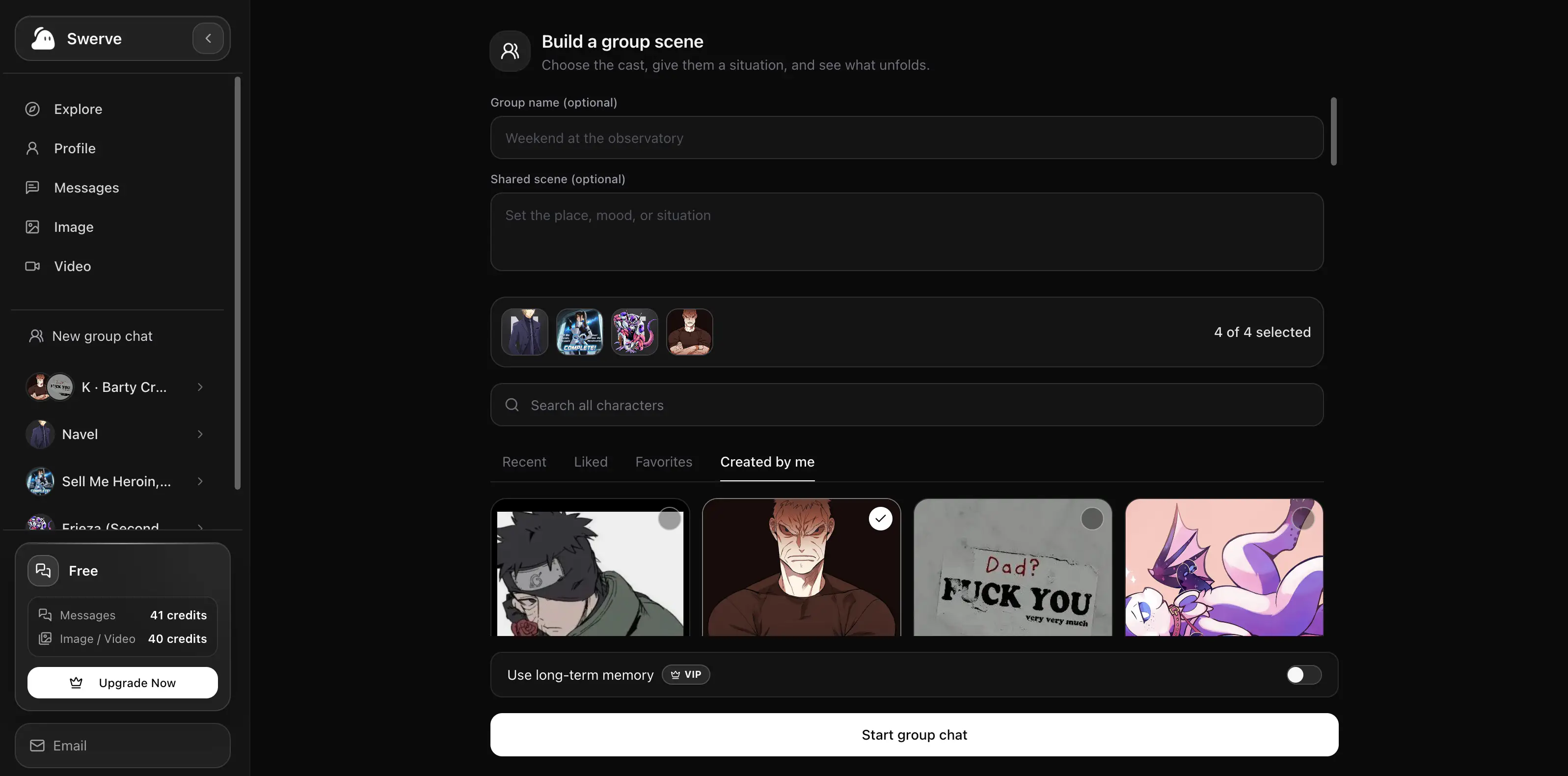
    A Swerve group chat with four characters in one shared conversation
    See the whole group reply in their own voice
    Swerve group chat setup with character selection and a shared scene
    Choose the cast and set the scene
    Create a group chat
    2026/07/26
    0.3.8

    🎭 Choose your role in every story

    Before you start chatting, tell the character who you are and what connects you. Save favorite personas to use again, or let AI help put your idea into words.

    2026/07/24
    0.3.7

    ✨ Three updates for smoother chats

    • 1. 🇵🇹 Swerve is now available in Portuguese.
    • 2. ✏️ On mobile, long-press your message to edit it; drafts can be cleared and undone.
    • 3. 🐛 Fixed a rare case where a chat could keep waiting after a brief connection stall.
    2026/07/19
    0.3.6

    🖼️ Bring your own character portrait

    When creating a character, you can now upload an image from your device and make their first impression feel like your own.

    2026/07/17
    0.3.5

    🐛 Bug fix: Next-step suggestions now follow the conversation

    Fixed a bug where the three suggestions under an earlier reply could remain after you sent a new message. They looked like options for your latest message, but were actually generated from the previous conversation.

    • 🧹 Previous suggestions now clear as soon as you send a new message.
    • ✨ Fresh suggestions appear after the new reply, based on the updated conversation.
    2026/07/17
    0.3.5

    🎬 Meet Picks: your next character is one swipe away

    Picks turns discovery into an immersive chat feed, so you can meet recommended characters, follow the conversation, and move to the next story without leaving the moment.
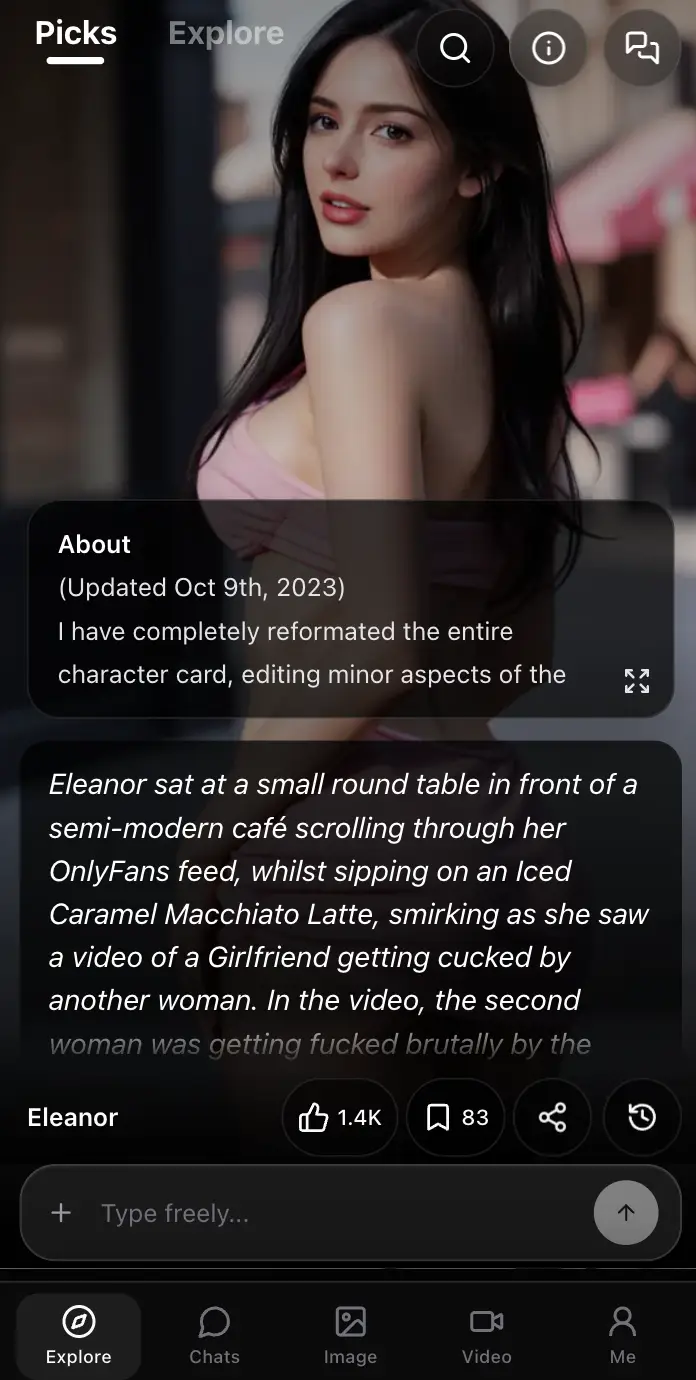
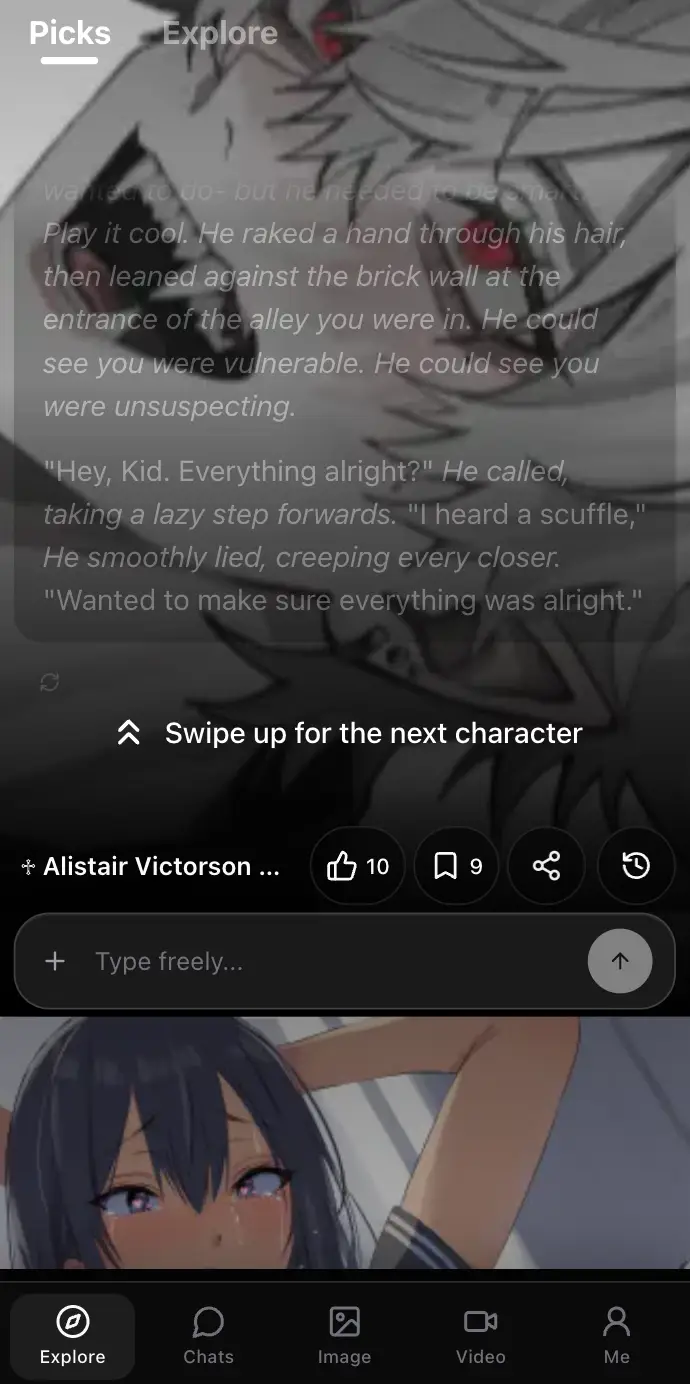
    • ⬆️ Swipe up or down at the conversation boundary to move between recommended characters.
    • ⚡ Faster page loading gets you to Swerve sooner, and Pricing and Discover tags now open normally.
    • 🪪 Avatar editing now works more reliably when you update your profile.
    • 🛠️ Additional fixes and responsive refinements make the experience smoother across more devices.
    Swerve Picks feed with an immersive character conversation
    Meet recommended characters in Picks
    Swerve Picks feed showing the swipe hint for the next character
    Swipe to the next character
    2026/07/15
    0.3.4

    🌍 Swerve now speaks more of your language

    Swerve is now available in Spanish, French, and German, so more conversations can feel natural from the first hello.

    2026/07/14
    0.3.3

    🛡️ Your experience, your choice

    One thoughtful suggestion helped make Swerve more comfortable: content choices are clearer from the moment you enter, while your existing chats and favorites stay untouched.
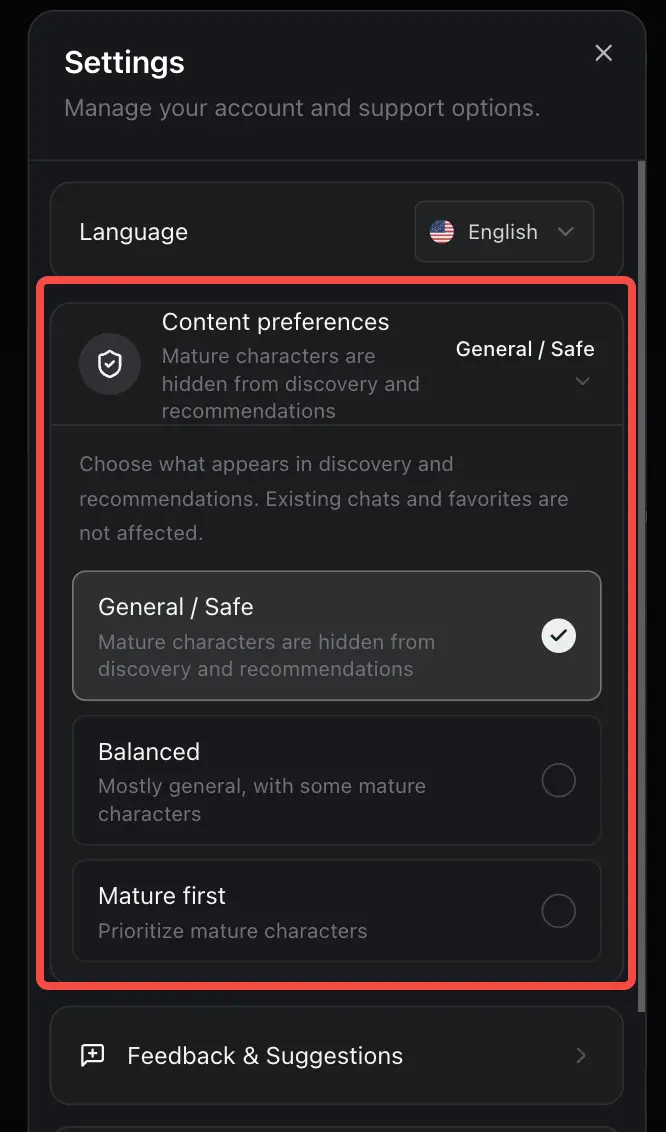
    • ✨ Choose General / Safe, Balanced, or Mature first; users under 18 stay in Safe mode.
    • 🧭 General / Safe keeps mature characters and explicit tags out of discovery, search, and recommendations.
    • 🔎 Keyword search now focuses on character names and story details instead of tags.
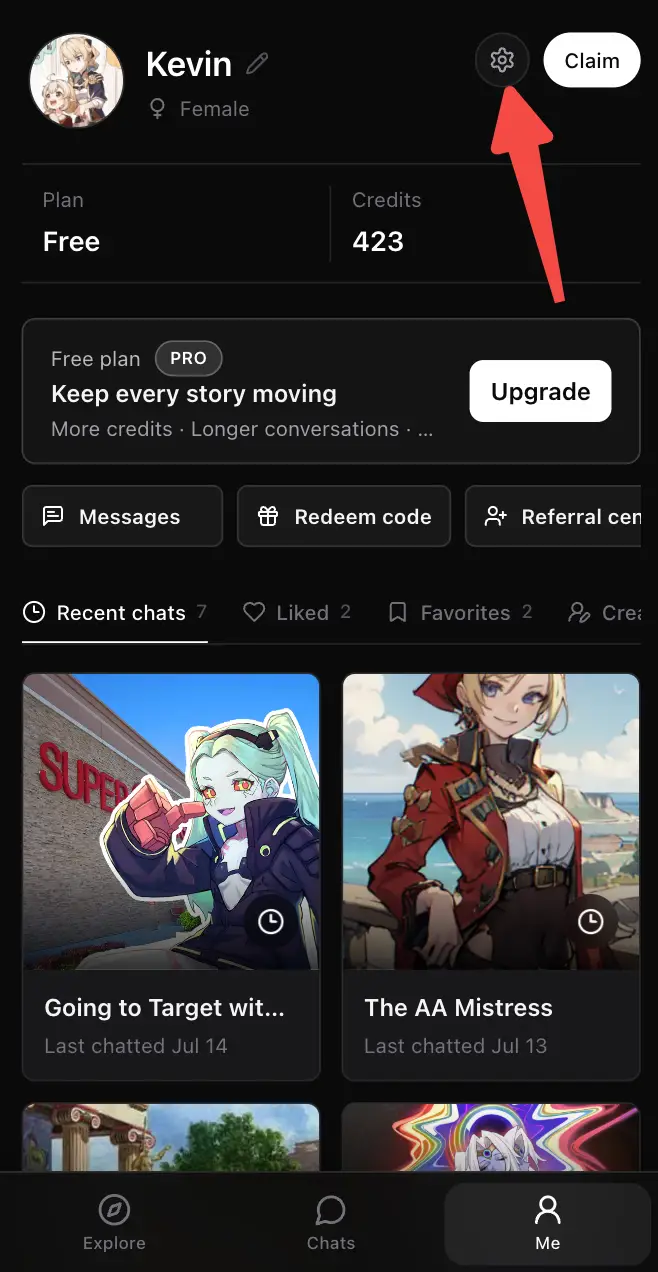
    • ⚙️ Change your preference anytime in Me > Settings > Content preferences.
    Swerve Me page with the Settings button highlighted
    Open Settings from Me
    Swerve content preferences inside Settings
    Choose your content preference
    2026/07/13
    0.3.1

    🔎 Search just got a whole lot sharper

    Your next character is closer than ever! Search is now clearer and more reliable. To celebrate, the first 100 people to redeem 6FLRY5W1 will receive 50 permanent credits. 🎁
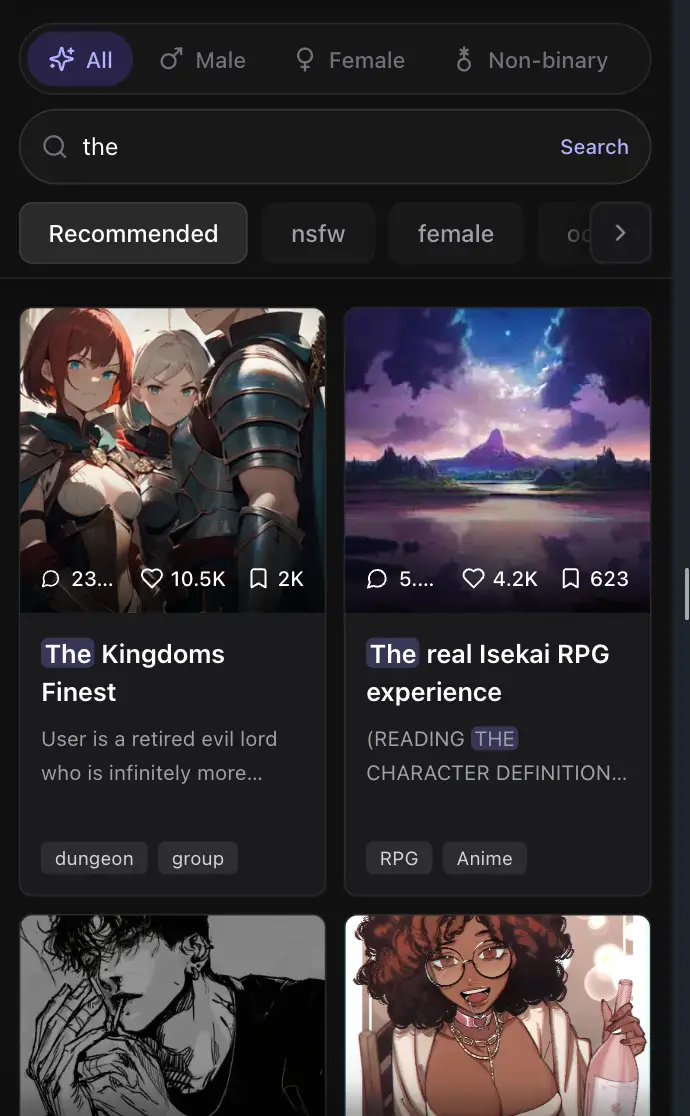
    • ✨ Search results stay focused on what you actually asked for.
    • 🏷️ Names and tags get priority, matches light up, and long names no longer hide their tags.
    • ⚡ A loading state makes it clear when your search is ready.
    • 🎟️ Code: 6FLRY5W1 · First 100 users · Ends July 19, 2026.
    Swerve mobile character search with highlighted matching results
    Clearer search matches on mobile
    Redeem 50 credits
    2026/07/13
    0.3

    📱 Mobile chat just became more immersive

    Your characters are ready to come closer. Mobile chat now brings the character and conversation into one immersive scene, making every exchange feel more focused and alive. ✨
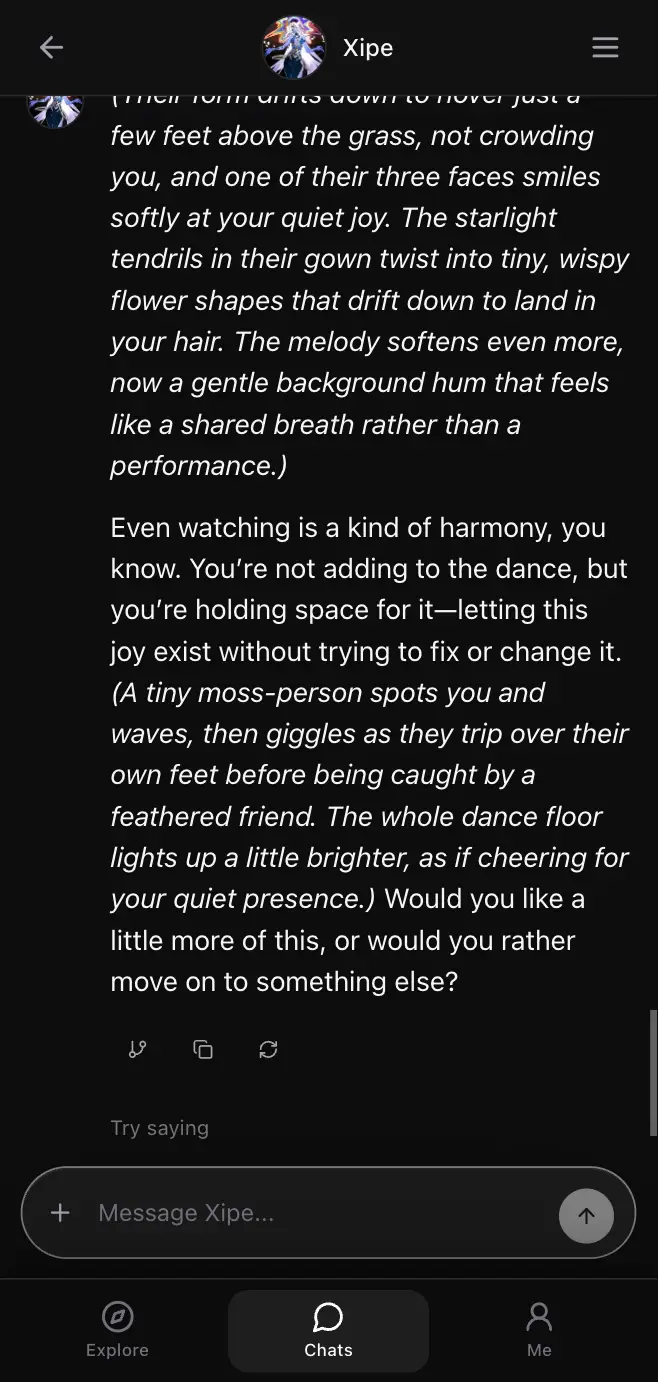
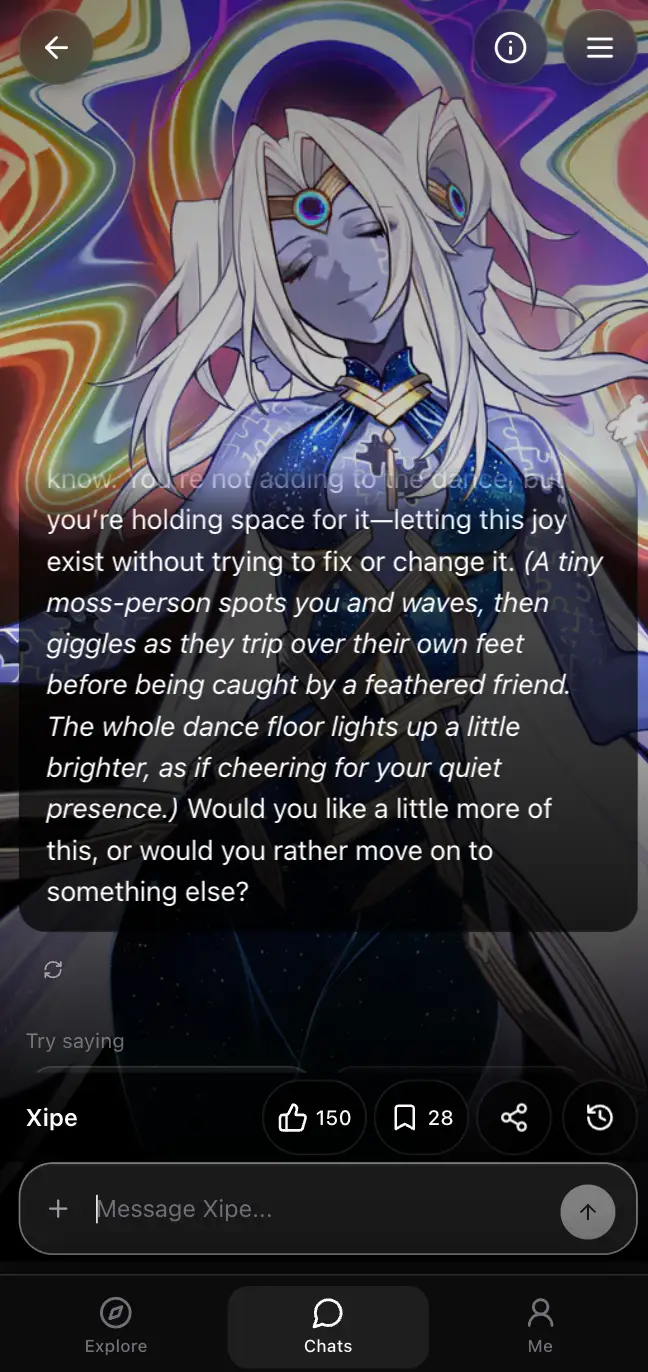
    • 🎭 Full-screen character artwork keeps your companion right there with you.
    • 📖 Stay with the latest exchange, then open history whenever you want the full story.
    • 💬 A refreshed composer and action bar make chatting, reacting, saving, and sharing easier.
    Swerve mobile character chat before the immersive redesign
    Before
    New immersive Swerve mobile character chat view
    Immersive mode
    Expanded conversation history in the new Swerve mobile chat
    Conversation history
    2026/07/13
    0.2

    ✨ Make your profile feel more like you

    Your profile just got a little more personal. Update it without leaving your page. ✨
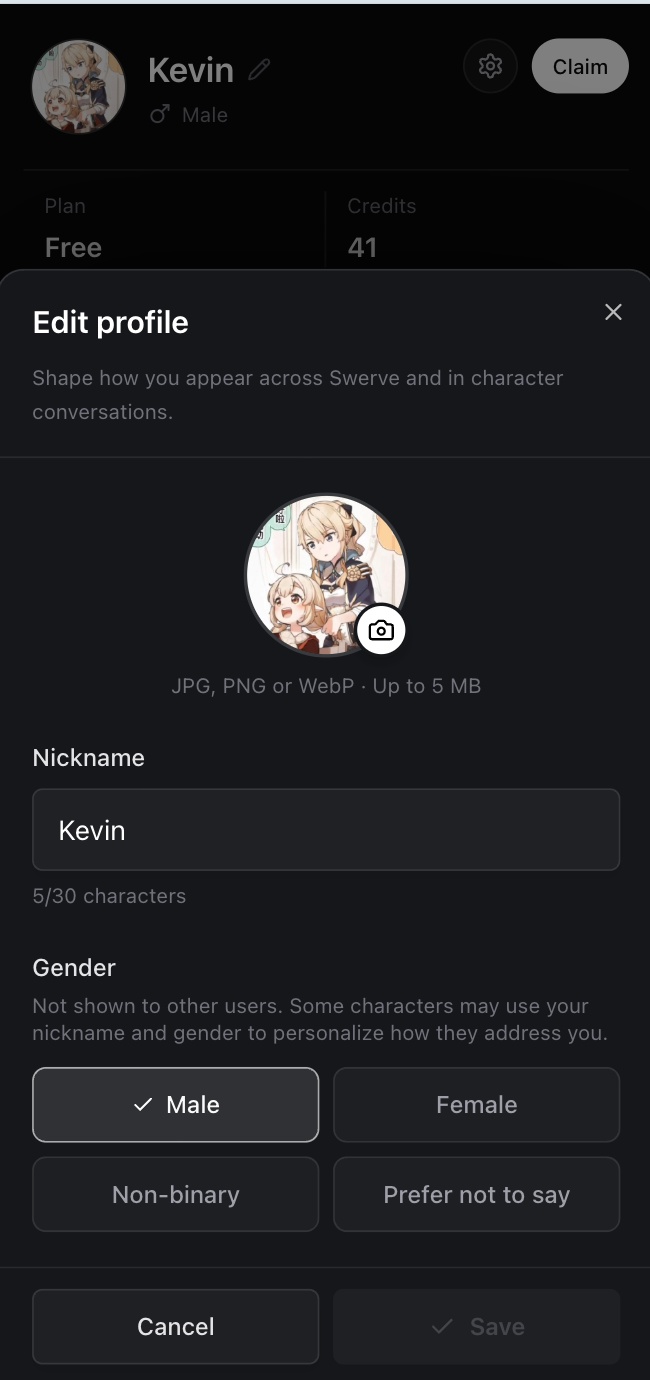
    • 🪪 Change your avatar and nickname in one place.
    • 💫 Set your gender preference to make character conversations feel more personal.
    Swerve profile editor with avatar, nickname, and gender settings
    2026/07/09
    0.1

    🚀 Swerve is live!

    The doors are open! Swerve is officially live. Discover AI characters, create your own, and start immersive one-on-one stories. Your next story starts here. 🚀